The Cost of Generative AI as Enterprise Search
Published:
Give me the TL;DR of this article with:
 ChatGPT
 Claude
 Perplexity
 Google AI
 Grok
Grok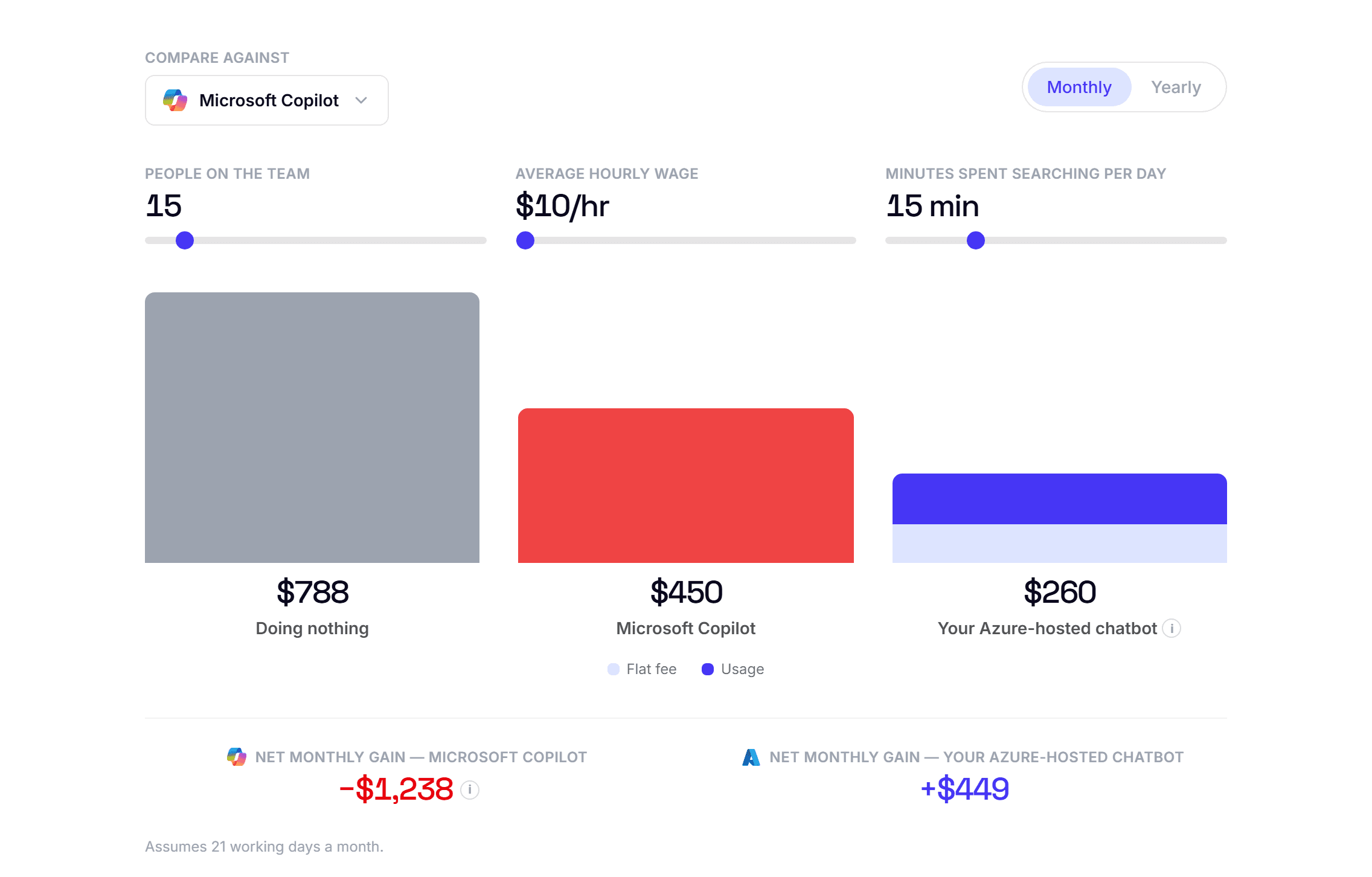
When you deploy an AI tool across your team, the assumption is that people will stop digging through SharePoint folders. The idea is that instead of searching, they just ask the model for the answer and move on with their day.
The reality is a bit more complicated.
If an engineer asks an AI for the structural limits of a specific part, the model might generate a perfectly accurate summary based on an old spec sheet. But an engineer cannot act on an AI summary. They need to verify the source. They have to open the 400-page document, hit CTRL+F, and hunt for the exact paragraph the AI used to generate its answer. Every minute spent doing that is time the AI was supposed to save. We wanted to visualize exactly how much this precision gap costs. We built an [interactive calculator](https://imdev.ai/solutions/internal-chatbot) to track the financial difference between doing nothing, using standard off-the-shelf AI, and deploying a custom system.
The math behind the illusion
The logic behind our calculator is straightforward. You input your team size, their average hourly wage, and the minutes they spend searching for files per day. Let's run a conservative scenario.
You have 15 people making $10/hour, and they spend 15 minutes a day looking for documents. Doing nothing costs the company about $788 a month in lost time. You might think buying a standard AI license fixes this. It doesn't. When you add a $450 flat fee for Microsoft Copilot, the net monthly gain actually drops into the negative (-$1,238).
Why? Because standard AI summarizes, but it rarely pinpoints. The license fee is paid, but the manual search time isn't eliminated.
Why standard models miss the mark
The problem is how general AI models handle enterprise data. They are incredibly good at drafting emails or synthesizing clean text. But if you look closely at how Microsoft handles file support, you hit hard limits on precision when dealing with unstructured work environments. We mapped out the feature differences below our calculator graph.
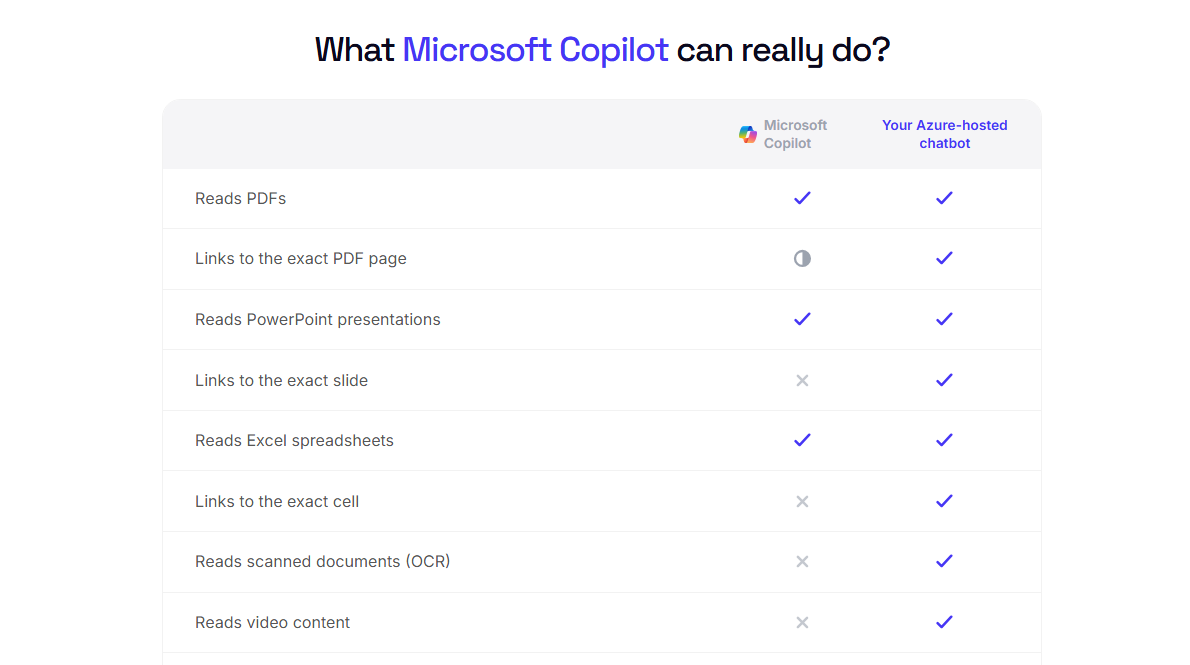
- A standard model reads a PDF, but it won't link to the exact page.
- It reads Excel spreadsheets, but it won't link to the exact sheet.
- It completely ignores unstructured data like scanned documents, photos, or video meeting recordings.
To solve this, you will want to go with an Azure-hosted chatbot option which is logic heavily biased toward exact-match retrieval. If the custom chatbot references a recorded meeting, it provides the exact video timestamp. If it pulls data from a scanned invoice, it uses OCR to pinpoint the exact text on the image. You chose this approach because cutting the search time to absolute zero is the only way to turn a net loss into a real monthly gain (+$449 in our conservative scenario).
Go try it yourself
The calculator is live for you to test right now. You can run your own numbers, but a quick warning: once you push that slider past 15 team members, the financial drain gets genuinely hard to look at. Instead of trying to explain it in a meeting, just use the button at the bottom to send the reality check straight to your IT department. They can take it from there.